

看到好多漂亮的特效,想切换展示,或者换心情展示,有些根据特定节日或季节展示,如春节快到了,我们想要挂大红灯笼,冬天展示雪花或者梅花,春天来了,樱花开了,想让博客页面樱花飘落,那么,怎么才能将这些特效全部写入并通过后台控制什么时候展出呢,本人参考博主“老狮的梦”发表的“typecho一些实用的美化代码”所说方法,调用“韩小韩API接口站”中代码,加入灯笼、雪花、梅花、樱花等特效,具体方法如下:
- 后台开启关闭按钮
在主题文件夹中找到functions.php文件(Joe主题路径usr/themes/Typecho-Joe-Theme/functions.php),在里面最下面添加以下代码(注意将代码代码包裹到php代码中,不是直接在最后添加):
/* 小特效后台功能按钮 */
    /* 灯笼 */
    $denglong= new Typecho_Widget_Helper_Form_Element_Select('denglong',array(0=>'不开启',1=>'开启'),0,'大红灯笼','介绍:大红灯笼高高挂,张灯结彩迎新春。');
    $form->addInput($denglong);
    $denglong->setAttribute('class', 'j-setting-content j-setting-global');

    /* 雪花 */
    $xiaxue= new Typecho_Widget_Helper_Form_Element_Select('xiaxue',array(0=>'不开启',1=>'开启'),0,'雪花飘飘','介绍:忽如一夜春风来,千树万树梨花开。');
    $form->addInput($xiaxue);
    $xiaxue->setAttribute('class', 'j-setting-content j-setting-global');

    /* 梅花 */
    $meihua= new Typecho_Widget_Helper_Form_Element_Select('meihua',array(0=>'不开启',1=>'开启'),0,'腊雪红梅','介绍:宝剑锋从磨砺出,梅花香自苦寒来。');
    $form->addInput($meihua);
    $meihua->setAttribute('class', 'j-setting-content j-setting-global');

    /* 樱花 */
    $yinghua= new Typecho_Widget_Helper_Form_Element_Select('yinghua',array(0=>'不开启',1=>'开启'),0,'浪漫樱花','介绍:樱花红陌上,杨柳绿池边。');
    $form->addInput($yinghua);
    $yinghua->setAttribute('class', 'j-setting-content j-setting-global');

    /* 波浪 */
    $bolang= new Typecho_Widget_Helper_Form_Element_Select('bolang',array(0=>'不开启',1=>'开启'),0,'碧波荡漾','介绍:飐滟荡碧波,炫煌迷横塘。');
    $form->addInput($bolang);
$bolang->setAttribute('class', 'j-setting-content j-setting-global');- 页面调用
在head.php(Joe主题路径usr/themes/Typecho-Joe-Theme/public/head.php)中添加以下代码:
<!-- 网页小特效 -->
      <!-- /* 灯笼 */ -->
<?php if($this -> options -> denglong == '1'): ?>
<script src="https://api.vvhan.com/api/denglong"></script>
<?php endif; ?>
      <!-- /* 雪花 */ -->
<?php if($this -> options -> xiaxue == '1'): ?>
<script src='https://api.vvhan.com/api/snow'></script>
<?php endif; ?>
      <!-- /* 梅花 */ -->
<?php if($this -> options -> meihua == '1'): ?>
<script src='https://api.vvhan.com/api/meihua'></script>
<?php endif; ?>
      <!-- /* 樱花 */ -->
<?php if($this -> options -> yinghua == '1'): ?>
<script src="https://api.vvhan.com/api/yinghua"></script>
<?php endif; ?>
<!-- 网页小特效 -->
注:波浪特效代码建议添加到footer.ph(Joe主题路径usr/themes/Typecho-Joe-Theme/public/footer.php)中,代码如下:
<!-- 小特效 -->
<?php if($this -> options -> bolang == '1'): ?>
<style>
.hans-container{
position: fixed;
bottom: 0px;
width: 100%;
height: 120px;
}
</style>
<div id="hans-bolang"></div>
<script src="https://api.vvhan.com/api/bolang"></script>
<?php endif; ?>
<!-- 小特效 -->- 后台开启特效
在后台主题设置中,开启或关闭特效。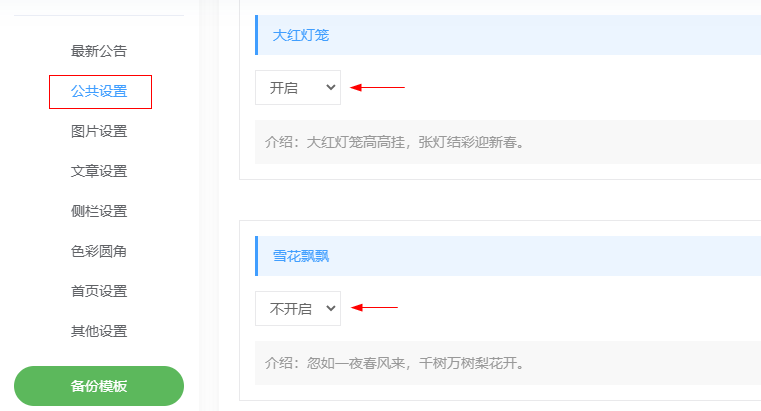
- 特别说明
代码参考:老狮的梦 https://laolion.com/archives/2480.html
特效调用:韩小韩API接口站 https://api.vvhan.com/



此处评论已关闭